Vertica 集成 MQTT
编译:JiangChong
技术探索
关于本文档
MQTT 用于 IoT 设备与服务器应用程序之间的数据交换。本文档的目标是集成 Vertica 和 MQTT,以分析 Vertica 中来自传感器设备的数据。在本案例中,我们使用 Mosquitto MQTT 代理将传感器数据中继并复制到 Vertica 以供进一步分析。我们运行 Python 程序模拟向 MQTT 代理发送数据的传感器,然后从 MQTT 代理读取数据并复制到 Vertica。
MQTT 概述
消息队列遥测传输(MQTT)是一种轻量级的发布/订阅网络协议,用于在 IoT 设备之间传输消息。MQTT 专为资源受限或带宽有限的设备设计,非常适合隔离监控和代码占用小的 IoT 框架。
前提条件
安装 MQTT 客户端和 Vertica 驱动所需的组件:
- Windows 或 Linux 机器,Python 3.6 或更高版本(本探索使用 Linux)
- pip 最新版本
- pip install paho-mqtt
- pip install vertica-python
测试环境
| 组件 | 详情 |
|---|---|
| MQTT Broker | Windows Server 2019 |
| Python 程序 | Linux 机器 |
| Vertica | 11.1.0 |
开始之前
在运行 Python 代码之前,确保 Vertica 数据库中存在相应的模式和表。本演示创建一个表来存储传感器 ID、时间戳和传感器值:
create schema mqtt;
create table mqtt.DHT22_Humidity_Data (
  SensorID varchar,
  Date_n_Time varchar,
  Humidity varchar
);
安装 Mosquitto MQTT Broker
MQTT 代理是 MQTT 架构中的中心单元,是一个接收消息并将消息路由到相应订阅客户端的服务器。
- 访问 https://mosquitto.org/download/ 下载 MQTT 代理安装程序(Windows)
- 双击安装程序并按照说明安装
- 安装后,打开
C:\Program Files\mosquitto目录下的mosquitto.conf文件,添加以下配置行: - MQTT 代理默认运行在 1883 端口。确保 Windows 机器上已开放 1883 端口
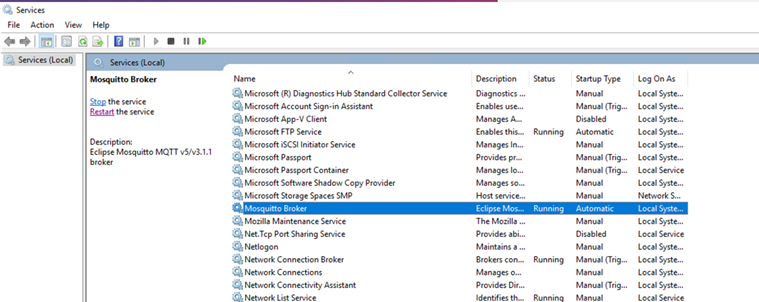
- 导航到 Windows 服务应用程序,重启 MQTT mosquitto 服务
Python 代码
本探索使用 4 个 Python 模块,每个模块在下方进行说明。
1. mqtt_Publish_Dummy_Data.py — 发布模拟传感器数据
该代码每秒向 MQTT 代理发布模拟湿度传感器数据。编辑文件,将 MQTT_Broker 值替换为 MQTT 代理的 IP 地址。
import paho.mqtt.client as mqtt
import random, threading, json
from datetime import datetime

#====================================================
# MQTT Settings
MQTT_Broker = "<IPADDRESS>"  # MQTT broker的IP地址
MQTT_Port = 1883
Keep_Alive_Interval = 60
MQTT_Topic_Humidity = "Home/BedRoom/DHT22/Humidity"

#====================================================

def on_connect(client, userdata, rc):
    if rc != 0:
        print("Unable to connect to MQTT Broker")
    else:
        print("Connected with MQTT Broker: " + str(MQTT_Broker))

def on_publish(client, userdata, mid):
    pass

def on_disconnect(client, userdata, rc):
    if rc != 0:
        pass

mqttc = mqtt.Client()
mqttc.on_connect = on_connect
mqttc.on_disconnect = on_disconnect
mqttc.on_publish = on_publish
mqttc.connect(MQTT_Broker, int(MQTT_Port), int(Keep_Alive_Interval))

def publish_To_Topic(topic, message):
    mqttc.publish(topic, message)
    print("Published: " + str(message) + " " + "on MQTT Topic: " + str(topic))
        print ("")
#====================================================
# Code to generate Dummy data to MQTT Broker
no_of_records = 0 # counter to get the number of dummy records generated

def publish_Fake_Sensor_Values_to_MQTT_test():
    threading.Timer(0.3, publish_Fake_Sensor_Values_to_MQTT_test).start()
    Humidity_Fake_Value = float("{0:.2f}".format(random.uniform(50, 100)))
    Humidity_Data = {}
    Humidity_Data['SensorID'] = "Dummy-1"
    Humidity_Data['Date_n_Time'] = str((datetime.today()).strftime("%d-%b-%Y-%H-%M-%S-%f"))
    Humidity_Data['Humidity'] = str(Humidity_Fake_Value)
    humidity_json_data = json.dumps(Humidity_Data)
    print("Publishing fake Humidity Value: " + str(Humidity_Fake_Value) + "...")
    publish_To_Topic(MQTT_Topic_Humidity, humidity_json_data)

publish_Fake_Sensor_Values_to_MQTT_test()

#====================================================
2. Store_Sensor_data_to_JSON_files.py — 聚合传感器数据到 JSON 文件
该程序将来自 MQTT 代理的传入数据聚合到 JSON 文件中。修改变量 no_of_rows_to_be_aggregated 以设置每个文件中聚合的行数(默认为 100000)。
import json
import vertica_python
import os
from os.path import exists


no_of_rows_to_be_aggregated = 100000 # give the no of rows to be aggregated in a JSON file


#===============================================================
# Functions to push Sensor Data into Database
file_number_counter = 0
i = 0 # No of records generated to be inserted into a the JSON file
#Function to copy the records inserted into a JSON file

#Function to insert the rows into a JSON file
def aggregate_humidity_rows(jsonData):
    json_Dict = json.loads(jsonData)
    global file_number_counter

    file_name = "data_"+str(file_number_counter)
    file_extension = ".JSON"
    file_name_complete = file_name+file_extension
    file_exists = exists(file_name_complete) # check if there is an exiting file
    if(file_exists):
        with open(file_name_complete, 'a', encoding='UTF8', newline='') as jsonfile:
            jsonfile.write(json.dumps(json_Dict))

    else:
        with open(file_name_complete, 'w', encoding='UTF8', newline='') as jsonfile:
            jsonfile.write(json.dumps(json_Dict))


    jsonfile.close()
    global i
    i = i+1 # counter value to decide how many rows to be inserted into the JSON file.
    print(i)
    if (i == no_of_rows_to_be_aggregated):
        i = 0
        file_number_counter = file_number_counter + 1
        newfile_name = file_name+"_completed"+file_extension
        os.rename(file_name_complete,newfile_name)

# Function to save Humidity to JSON File
def DHT22_Humidity_Data_Handler(jsonData):
    #Parse Data or perform Transformations if any.

    #Aggregate the data
    aggregate_humidity_rows(jsonData)

#===============================================================
# Master Function to Select DB Funtion based on MQTT Topic

def sensor_Data_Handler(Topic, jsonData):
    if Topic == "Home/BedRoom/DHT22/Temperature": #Temparature Topic handler not implemeted in this demo
        DHT22_Temp_Data_Handler(jsonData)
    elif Topic == "Home/BedRoom/DHT22/Humidity":
        DHT22_Humidity_Data_Handler(jsonData)

#===============================================================
3. mqtt_Listen_Sensor_Data.py — 监听 MQTT 传感器数据
编辑此文件,将 MQTT_Broker 变量值设置为 MQTT 代理运行的正确 IP 地址。
import paho.mqtt.client as mqtt
from store_sensor_data_to_JSON_files import sensor_Data_Handler

# MQTT Settings
MQTT_Broker = "172.16.67.57"
MQTT_Port = 1883
Keep_Alive_Interval = 45
MQTT_Topic = "Home/BedRoom/#"

#Subscribe to all Sensors at Base Topic
def on_connect(self, mosq, obj, rc):
    mqttc.subscribe(MQTT_Topic, 0)

#Save Data into DB Table
def on_message(mosq, obj, msg):
    # This is the Master Call for saving MQTT Data into DB
    # For details of "sensor_Data_Handler" function please refer "sensor_data_to_db.py"
    print ("MQTT Data Received...")
    #print ("MQTT Topic: " + str(msg.topic))
    #print ("Data: " + str(msg.payload))
    sensor_Data_Handler(msg.topic, msg.payload)

def on_subscribe(mosq, obj, mid, granted_qos):
    pass

mqttc = mqtt.Client()

# Assign event callbacks
mqttc.on_message = on_message
mqttc.on_connect = on_connect
mqttc.on_subscribe = on_subscribe

# Connect
mqttc.connect(MQTT_Broker, int(MQTT_Port), int(Keep_Alive_Interval))

# Continue the network loop
mqttc.loop_forever()
4. copy_all_files_to_vertica.py — 将 JSON 文件复制到 Vertica
该程序持续查找当前目录中包含 "completed" 名称的 JSON 文件,将其复制到 Vertica,并在处理后删除文件。编辑 conn_info 以连接到 Vertica 服务器。
import vertica_python
import os

class DatabaseManager():
    def __init__(self):
        conn_info = {'host': '10.20.71.42', 'port': 5433, 'user': 'dbadmin', 'password': '<_password_>', 'database': 'VMart'}
        try:
            self.conn = vertica_python.connect(**conn_info)
        except Exception as e:
            print(e)
        self.conn.commit()
        self.cur = self.conn.cursor()

    def add_del_update_db_record(self, sql_query, args=()):
        self.cur.execute(sql_query, args)
        self.conn.commit()
        return
    def copy_JSON_records_to_vertica(self, sql_query, args=()):
        self.cur.copy(sql_query, args)
        self.conn.commit()
        return

    def __del__(self):
        self.cur.close()
        self.conn.close()

#The below function will be continuosly looking for JSON files with "completed" name in them
def get_all_the_files_list_copy_to_vertica():
    while (True):
        for i in os.listdir():
            if "completed" in i:
                print(i)
                dbObj = DatabaseManager()
                with open(i, "rb") as fs:
                    dbObj.copy_JSON_records_to_vertica("COPY mqtt.DHT22_Humidity_Data(SensorID, Date_n_Time, Humidity) FROM STDIN parser fjsonparser()", fs)
                del dbObj
                print ("Inserted Humidity Data into Database.")
                print ("")
                fs.close()
                os.remove(i)


get_all_the_files_list_copy_to_vertica()
执行 Python 代码
将所有上述 Python 程序复制到 Linux 机器的可访问目录中。
第 1 步: 打开一个终端,执行以下命令生成并向 MQTT 代理发布模拟数据:
成功执行后,应看到模拟数据正在发布到代理。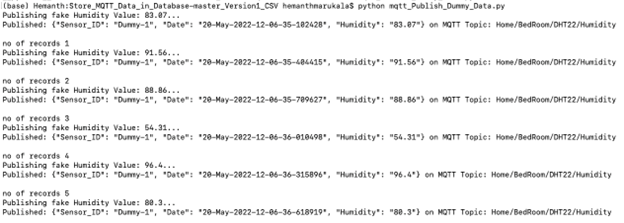
第 2 步: 在新终端窗口中执行以下命令以收集数据、批量处理并插入到 JSON 文件中:
成功执行后,可以看到包含传感器数据的 JSON 文件在同一目录中生成。第 3 步: 在新的终端窗口中执行以下命令,将所有生成的 JSON 文件复制到 Vertica:
连接到 Vertica 验证数据是否已正确插入。可以看到数据从 MQTT 代理读取的同时被复制到 Vertica 中。
原文来源:https://www.vertica.com/kb/MQTT_TE/Content/Partner/MQTT_TE.htm