Vertica 与 ReactJS:技术探索
编译:JiangChong
本解决方案的目标是创建一个示例 ReactJS 应用程序,使用 vertica-nodejs 驱动构建使用 Vertica 的 UI。ReactJS 是基于 JavaScript 的前端 UI 开发库。要连接 Vertica 和 ReactJS,使用了开源 vertica-nodejs 客户端驱动。需要有一个包含示例数据的 Vertica 数据库和 ReactJS。
ReactJS 概述
ReactJS 是一个流行的用于构建界面的 JavaScript 库。React 使您能够创建交互式 UI,并高效更新和渲染应用程序每个状态的正确组件。ReactJS 也可在服务器端使用 Node 进行渲染。
测试环境
- Vertica Analytic Database v12 on RHEL7.9
- NodeJS v18.12.1
- vertica-nodejs 驱动 v1.0.0
- ReactJS v18.2.0
- Windows Server 2019
安装 ReactJS
- 从 NodeJS 网站下载并安装 node.js
- 创建一个文件夹并在 IDE 中打开(本示例使用 VS Code)
- 在 VSCode 终端中运行:
npx create-react-app my-app - 进入新文件夹 my-app,运行
npm start - 应用程序在浏览器中打开,托管在
https://localhost:3000/
注意: 确保端口 3000 开放监听。如果不是,可以通过其他端口启动应用程序。
安装 Vertica 客户端驱动
在项目目录中安装 vertica-nodejs 包。按照 vertica-nodejs 文档中的 Installation 和 Post Installation 部分配置驱动。
集成 ReactJS 和 Vertica
本示例中,Vertica 数据库中有一个 Employee 表。目标是获取员工列表并在浏览器中使用 ReactJS 渲染。
代码分为两部分:客户端(client)和服务器(server),在主目录 (my-app) 下创建两个子目录。
服务器端代码
服务器端执行 API 调用,从 Vertica 数据库的 Employee 表获取结果集:
const { Client } = require('vertica-nodejs');
const client = new Client();

async function setup() {
    client.connect();
}

app.get('/getemployees', (req, res) => {
    setup();
    client.query("select * from node_emp order by id", (err, results) => {
        if (err) {
            console.log(err);
        } else {
            res.status(200).send(results.rows);
        }
    });
});
前端 ReactJS 组件
前端从后端(服务器)调用 API: 以下函数 App() 会调用后端(服务器)的 API。接收到数据后,setEmployeeList() 会返回查询结果集中的所有行。
import { useState } from "react";
import axios from 'axios';

function App() {
    const [employeeList, setEmployeeList] = useState([]);

    const getEmployees = () => {
        axios.get("http://localhost:3001/getemployees").then((res) => {
            setEmployeeList(res.data);
        });
    }
要在浏览器中渲染查询到的数据,可以通过调用 getEmployees() 方法返回已包含 employeeList 对象的值。然后,我们将这些键值对以 JSX 的形式映射到浏览器中,以显示相应的行。
    return (
        <div>
            <button onClick={getEmployees}>Get employees</button>
            {employeeList.length > 0 && (
                <table>
                    <thead>
                        <tr>
                            <th>ID</th>
                            <th>First Name</th>
                            <th>Last Name</th>
                            <th>Age</th>
                        </tr>
                    </thead>
                    <tbody>
                        {employeeList.map((val, key) => {
                            return (
                                <tr key={key}>
                                    <td>{val.id}</td>
                                    <td>{val.first_name}</td>
                                    <td>{val.last_name}</td>
                                    <td>{val.age}</td>
                                </tr>
                            );
                        })}
                    </tbody>
                </table>
            )}
        </div>
    );
}
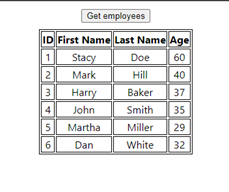
点击 Get employees 按钮后,员工列表将渲染并在浏览器中显示。
注意: 可根据需求或用例自定义代码。
更多信息
- Vertica-NodeJS NPM Package
- ReactJS 网站
- Vertica Community Edition
- Vertica User Community
- Vertica Documentation
原文来源:https://www.vertica.com/kb/ReactJS_TE/Content/Partner/ReactJS_TE.htm