Vertica Eon 模式数据库的备份
1、概述
在 Eon 模式数据库中,数据存储与计算资源是分离的。 Eon 模式下的 Vertica 可以部署在云环境(例如 AWS S3)和本地对象存储(例如 Flashblade 上的 Pure Storage、HDFS 等)中。
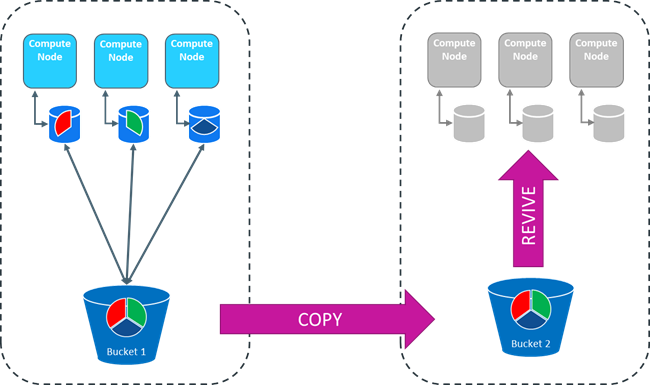
这种计算与存储的分离架构使得备份 Eon 模式数据库只需从公共存储中复制并恢复该副本即可。
本文提供了备份建议以及执行 Eon 模式热备份的步骤。
Eon 模式“热备份”过程作为 Vertica 版本 10.x 的测试版功能提供,现在从版本 11.0 及更高版本开始受支持。
2、常见用例
以下是常见用例的列表:
1、持续增量备份:恢复数据库并像恢复备份一样使用它。
2、升级支持:通过“快照”创建副本。您可以在升级的 Vertica 版本中恢复副本,对其进行检查,然后将工作负载从旧数据库和旧版本移动到新数据库副本和新版本。
3、存储桶复制:使用本地或云存储存储桶复制实用程序通过快速数据同步将数据从一个存储桶移动到另一个存储桶,同时保持数据一致性。
4、保持 Eon 模式数据库快照一致:使用重复同步和暂停 Eon 模式数据库。
5、快速 Eon 模式数据库快照:与远程主机备份相比,具有以下优势:
- 速度:使用其中一种存储实用程序(例如 Pure Storage 快速复制快照)创建数据库快照比远程主机完整备份要快得多。这可以用作 S3 对象存储上不存在的 EE 硬链接本地备份的替代方案。
- 减少网络活动:通过 Eon 模式热备份进行快照可最大限度地减少网络负载,因为它不需要 rsync 将文件复制到远程备份主机。
3、一致性考虑因素
Eon 模式 Catalog 是在集群的每个节点的内存中维护的元数据存储。元数据描述数据库中的对象,例如表、投影、检查点、事务日志等。Catalog 会定期写入公共存储(“同步”),缺省每五 (5) 分钟一次或在执行某些命令时写入。Catalog 写入后,公共存储中的数据库是一致的。然而,对于正在运行中的数据库来说,同步不会持续很长时间,因此一致性也不会持续很长时间。
如果底层数据文件(ROS 文件)没有改变,那么目录与最新变化可能不一致是可以接受的。因为 ROS 文件是不可变的,那 Catalog 指向的数据文件也不会发生变化。而且,新的数据加载到新的文件中,这不会影响过去已经存在的文件的一致性。然而,我们必须考虑旧的 ROS 文件。ROS 文件在数据压缩(“mergeout”)时会被删除,或者在对象被删除时被移除。因此,备份过程必须是一个真正的“快照”,且备份过程中的任何部分不能独立运行。例如,利用存储供应商的后台桶复制并不是一个好主意,因为当源桶中的 ROS 文件被删除时,它很可能也会删除目标桶中的 ROS 文件,而这些文件对备份来说仍然至关重要。
我们建议您将 Catalog 中的所有文件保存为单个操作以保持一致性。为此,您需要在复制时冻结 Catalog 操作。以下是更改目录同步间隔、强制目录同步和监视同步的命令:
- 通过修改 CatalogSyncInterval 参数更改目录同步间隔。
- 通过 sync_catalog() 命令强制同步 Catalog。
- 通过 Vertica 系统表 dc_catalog_persistence_events 监控同步过程。
在开始备份或快照之前,您必须确保在公共存储上的 Catalog 的持久副本包含所有最近的更改,然后停止其在公共存储上的进程。您可以使用以下过程来确保数据库的目录在备份开始时是最新的,方法是停止节点和其公共存储副本之间的目录同步。在备份运行时,每个节点上的本地目录副本继续前进,但公共存储上的目录副本直到创建备份或快照后才会前进。
- 要启动热备份,您必须完成最新的 Catalog 同步,然后将 Catalog 同步推迟几个小时。
- 要结束热备份,您必须再次启用 Catalog 同步自动化默认设置。
4、其他考虑因素
- 在企业模式下,您可以将数据库恢复到与 Last Good Epoch (LGE) 一致的状态。在 EON 模式下,没有 LGE。当您恢复 Eon 模式数据库克隆时,其 Catalog 版本将是克隆前同步完成时的版本。Catalog 同步暂停后的所有 Catalog 和数据库更改都不会被克隆。
- 如果您的集群在 Catalog 同步禁用期间崩溃,您只能恢复到 Catalog 同步禁用之前的 Catalog 版本。您暂停同步的时间越长,如果本地目录损坏,您可能会丢失的 Catalog 和数据库事务就越多,并且您需要从公共存储中恢复。
- 无论同步状态如何,节点上的本地目录在提交后始终是最新的。
- 即使 Vertica 进程崩溃或 Vertica 集群关闭,较长的同步间隔也不会造成损害,但硬件故障很重要。
- 如果一个节点宕机,这没关系,因为假设 K-Safe 为 1,每个分片都由两个节点订阅。
- Eon Mode 数据库管理员有责任在备份或快照结束后验证目录同步更新。
5、重要提示:定期检查目录同步
同步暂停的时间越长,如果本地 Catalog 损坏或删除,您可能会丢失的 Catalog 和数据库事务就越多。为了降低风险,我们建议您每天检查 Catalog 同步是否正常。
在下面的检查示例中,请注意节点 01 - 24 的最后一次同步是在最后 5 分钟的时间范围内。
sync_catalog_version 值为 -1 的节点未同步。因此,节点 25 - 30 从未同步,因为这些节点是辅助子集群的一部分。
select * from catalog_sync_state;

node_name            sync_catalog_version  earliest_checkpoint_version  sync_trailing_interval  last_sync_at
-------------------  --------------------  ---------------------------  ----------------------  -------------------
v_mydb_node0001      194529968             193747480                    2256                    2021-09-05 14:26:56
v_mydb_node0002      194528984             193714726                    3240                    2021-09-05 14:23:59
v_mydb_node0003      194529844             193742734                    2380                    2021-09-05 14:26:29
v_mydb_node0004      194529797             193760761                    2427                    2021-09-05 14:25:48
v_mydb_node0005      194529968             193748543                    2256                    2021-09-05 14:26:55
v_mydb_node0006      194529970             193742132                    2254                    2021-09-05 14:27:09
v_mydb_node0007      194529968             193783489                    2256                    2021-09-05 14:26:53
v_mydb_node0008      194529828             193780272                    2396                    2021-09-05 14:26:19
v_mydb_node0009      194529967             193756834                    2257                    2021-09-05 14:26:49
v_mydb_node0010      194529495             193766752                    2729                    2021-09-05 14:25:18
v_mydb_node0011      194529822             193782671                    2402                    2021-09-05 14:26:16
v_mydb_node0012      194529967             193789813                    2257                    2021-09-05 14:26:47
v_mydb_node0013      194529967             193788900                    2257                    2021-09-05 14:26:47
v_mydb_node0014      194529968             193367115                    2256                    2021-09-05 14:27:03
v_mydb_node0015      194529807             193792960                    2417                    2021-09-05 14:26:01
v_mydb_node0016      194529963             193776940                    2261                    2021-09-05 14:26:33
v_mydb_node0017      194529815             193751857                    2409                    2021-09-05 14:26:07
v_mydb_node0018      194529819             193315002                    2405                    2021-09-05 14:26:12
v_mydb_node0019      194529969             193324735                    2255                    2021-09-05 14:27:05
v_mydb_node0020      194529822             193761734                    2402                    2021-09-05 14:26:15
v_mydb_node0021      194529373             193406043                    2851                    2021-09-05 14:25:14
v_mydb_node0022      194529355             193776027                    2869                    2021-09-05 14:25:12
v_mydb_node0023      194529968             193760761                    2256                    2021-09-05 14:26:57
v_mydb_node0024      194529971             193321333                    2253                    2021-09-05 14:27:17
v_mydb_node0025      -1                    -1                           194532225               2000-01-01 02:00:00
v_mydb_node0026      -1                    -1                           194532225               2000-01-01 02:00:00
v_mydb_node0027      -1                    -1                           194532225               2000-01-01 02:00:00
v_mydb_node0028      -1                    -1                           194532225               2000-01-01 02:00:00
v_mydb_node0029      -1                    -1                           194532225               2000-01-01 02:00:00
v_mydb_node0030      -1                    -1                           194532225               2000-01-01 02:00:00
5、通过 Pure Storage S3 Fast Copy 创建数据库副本
同一 FlashBlade 存储桶内的 Pure Storage S3 复制过程现在使用“基于引用的复制”,其中数据未进行物理复制,因此过程更快。Pure Fast Copy 不适用于 S3 上传和复制或不同存储桶之间的复制。
使用 Eon Mode Hot Backup 和 Pure Storage Purity//FB FlashBlade 操作系统 V3.x 可以使用 FlashBlade Pure 的统一横向扩展对象存储系统。可以连接两个 FlashBlade 阵列或一个 FlashBlade 和一个 AWS S3 目标,从而实现从阵列上的一个存储桶到第二个阵列或 S3 目标上的存储桶的异步对象复制。
6、通过 Pure 的快速复制快照在另一个集群上创建完整的 S3 存储桶副本
1、停止同步原始数据库。 例如,
alter database default SET CatalogSyncInterval = '6 hours';
select hurry_service('System','TxnLogSyncTask');
3、更新同步。
4、停止数据库。5、删除数据库。
6、在新的副本上恢复数据库。
admintools -t revive_db -x auth_params.conf --communal-storage-location=s3://communal_store_path -s host1_ip,... -d database_name
7、从新副本启动数据库以进行检查。
8、在新副本上停止数据库。
9、从原始数据库恢复。
10、启动原始数据库。
7、Pure Fast-Copy 快照过程记录
# Stop catalog sync on our prod db named soda
# And set sync interval to 6 hours, as clone usually runs about 5 minutes
alter database default set CatalogSyncInterval = '6 hours';
select hurry_service('System','TxnLogSyncTask');
select count(*) from system_services where service_name='TxnLogSyncTask' and last_run_end is null;
# Make sure the above returns zero
# Create the clone
docker run -d --network=host --name=s5cmd -v /home/rgolovak/.aws:/root/.aws peakcom/s5cmd --endpoint-url=http://<pure_ip> cp 's3://vertica/prod/soda/*' s3://vertica/clones/revive/soda/
# For this to work properly , need to set sysctls (make sure return code is 0):
sysctl net.ipv4.ip_local_port_range="16384 65535"
sysctl net.ipv4.tcp_fin_timeout=20
sysctl net.ipv4.tcp_tw_reuse=1
# Resume catalog sync:
alter database default clear CatalogSyncInterval;
select hurry_service('System','TxnLogSyncTask');
# Stop DB:
admintools -t stop_db -d soda -p <db_pass> -F
# Drop DB:
admintools -t drop_db -d soda
# Manually delete depot path on all nodes:
# NOTE: In the future this will be done automatically as part of the drop DB process
rm -rf /date/depot/soda
# Revive from clone path:
admintools -t revive_db --communal-storage-location=s3://vertica/clones/revive/soda -s <our_cluster_spread_ips> -d soda -x /home/dbadmin/auth_params.conf
# NOTE: remove --force so that revive is much faster (depot must be clean)
# Start DB on the new replica
admintools -t start_db -d soda -p <db_pass> -F
# After validating data is good you can stop, drop, delete depot of clone instance, and revive back to original prod DB.
8、在 HDFS 上热备份 Eon 模式数据库过程记录
# Python script example to create an Eon Mode DB backup on-prem HDFS on any
# storage infrastructure.  Eon Mode on HDFS and Eon Mode FS for fast backup
# use HDFS snapshot capabilities to get fast and as many snapshots as you
# want without the need for a full backup nor copy files to
# external storage or bucket.
import vertica_python
import sys
import pyhdfs
import time

queries = {
    "Disable automatic sync": "ALTER DATABASE default SET CatalogSyncInterval = '10 years';",
    "Hurry_catalog_sync": "SELECT hurry_service('System','TxnLogSyncTask');",
    "Check_if_can_sync": "SELECT count(*) FROM system_services "
                         "WHERE service_name='TxnLogSyncTask' AND last_run_end IS NULL;",
    "Sync catalog": "SELECT sync_catalog();",
    "get_communal_location": "SELECT location_path FROM storage_locations WHERE sharing_type='COMMUNAL';",
    "Enable sync": "ALTER DATABASE default clear CatalogSyncInterval;",
}

def get_vertica_conn(db, user, passwd, host, port, session_label):
    try:
        # Vertica connection
        connection_config_dict = {
            'user': user,
            'password': passwd,
            'host': host,
            'port': port,
            'database': db,
            # autogenerated session label by default,
            'session_label': session_label
        }

        return vertica_python.connect(**connection_config_dict)

    except Exception as e:
        print("Failed to return a connection to {}: {}".format(host, e), flush=True)
        sys.exit(1)

def disable_catalog_sync(vrt_conn):
    print("Disabling catalog sync service ...")
    query_name = "Disable automatic sync"
    vrt_conn.execute(queries[query_name])

    query_name = 'Hurry_catalog_sync'
    vrt_conn.execute(queries[query_name])

    query_name = 'Check_if_can_sync'
    res = vrt_conn.execute(queries[query_name])
    while int(res.fetchone()[0]) != 0:
        time.sleep(5)
        res = vrt_conn.execute(queries[query_name])

    # Manually sync catalog to communal storage again to ensure
    # revive version is bumped to the latest
    query_name = 'Sync catalog'
    res = vrt_conn.execute(queries[query_name])
    print(res.fetchone()[0])

def enable_catalog_sync(vrt_conn):
    print("Enabling catalog sync service")
    query_name = 'Enable sync'
    vrt_conn.execute(queries[query_name])

    query_name = 'Hurry_catalog_sync'
    vrt_conn.execute(queries[query_name])

def get_communal_location(vrt_conn):
    query_name = 'get_communal_location'
    res = vrt_conn.execute(queries[query_name]).fetchone()
    hdfs_location = res[0]
    print("hdfs location = {}".format(hdfs_location))
    return hdfs_location

# Creating hdfs snapshot backup
def run_backup(cluster, hdfs_location):
    print("Starting hdfs backup for vertica cluster {}.format(cluster)")
    snapshot_name = f"{cluster}_{time.strftime('%Y%m%d-T%H%M%S')}"
    hdfs_client = pyhdfs.HdfsClient(user_name='dbadmin')
    hdfs_client.create_snapshot(path=hdfs_location, snapshotname=snapshot_name)
    print(f"Created snapshot {snapshot_name}")
    return snapshot_name

def main():
    print("START BACKUP EON JOB")
    # init Vertica connection
    try:
        conn_vertica = get_vertica_conn(db='XXX', user='dbadmin', passwd='XXX', host='XXX', port=5433, session_label='eon_hotbackup')
        vrt_conn = conn_vertica.cursor()
    except Exception as err:
        print("failed to connect to vertica cluster")
        exit(2)

    # Get communal storage path
    hdfs_location = get_communal_location(vrt_conn)

    # Disable catalog sync service
    disable_catalog_sync(vrt_conn)

    # Execute the hot backup command
    snapshot_name = run_backup('vrta', hdfs_location)

    # Enable catalog sync service back
    enable_catalog_sync(vrt_conn)

    # close Vertica connection
    conn_vertica.close()
    print("END BACKUP EON JOB")

if __name__ == '__main__':
    try:
        main()
    except Exception as err:
        print ('Backup EON exception: %s' % str(err))
        sys.exit(2)
扩展阅读
- Vertica Eon 模式中分片、节点和 Depot 选择的最佳实践 — Eon 模式分片、节点和 Depot 规划指南
- Vertica 与 AliCloud-1-使用阿里云对象存储 OSS 部署 Eon 数据库 — Eon 模式在阿里云上的部署
- Vertica 备份与恢复方案总览 — 备份恢复全方案对比
- Vertica RAID 存储方案 — 存储选型指南