Vertica Re-IP 地址变更完整指南
原文:Re-IP: Checking All IP Addresses when Changing Using Re-IP
概述
Re-IP 工具修改 Vertica Catalog 中的 IP 地址。但除 Catalog 外,还有其他配置位置存储了 IP 地址——有些由 Re-IP 工具自动更新,有些需要手动修改。本文完整介绍了所有需要变更的配置。
示例场景
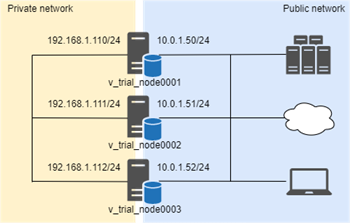
集群使用两个网段:私网(集群内部通信)和公网(导出/导入操作)。IP 地址变更如下:
| 节点 | 私网-旧IP | 私网-新IP | 公网-旧IP | 公网-新IP |
|---|---|---|---|---|
| node0001 | 192.168.1.110/24 | 192.168.100.10/24 | 10.0.1.50/24 | 10.20.0.100/24 |
| node0002 | 192.168.1.111/24 | 192.168.100.11/24 | 10.0.1.51/24 | 10.20.0.101/24 |
| node0003 | 192.168.1.112/24 | 192.168.100.12/24 | 10.0.1.52/24 | 10.20.0.102/24 |
一、Re-IP 自动更新的配置
Re-IP 工具会自动更新以下地址:
- Node address(节点地址)
- Control Node address 和 Broadcast address(可选)
执行前检查
node_name         | node_address  | export_address
------------------+---------------+----------------
v_trial_node0001  | 192.168.1.110 | 10.0.1.50
v_trial_node0002  | 192.168.1.111 | 10.0.1.51
v_trial_node0003  | 192.168.1.112 | 10.0.1.52
检查 admintools.conf:
[Cluster]
hosts = 192.168.1.110,192.168.1.111,192.168.1.112

[Nodes]
node0001 = 192.168.1.110,/home/dbadmin,/home/dbadmin
...
v_trial_node0001 = 192.168.1.110,/home/dbadmin,/home/dbadmin
...
检查 spread.conf:
二、执行 Re-IP
1. 安全关闭集群,修改 IP 和网络配置
关闭集群,修改所有节点的 IP、防火墙、硬件负载均衡器等。用 ping 和 ssh 验证节点间网络通。
2. 创建 Mapping 文件
格式:oldIPaddress newIPaddress, controlAddress (可选), controlBroadcast (可选)
oldIP 和 newIP 之间不要用逗号分隔。
3. 执行
输出示例:
Parsing mapfile ...
New settings for Host 192.168.1.110 are:
  address: 192.168.100.10
  controlAddress: 192.168.100.10
  controlBroadcast: 192.168.100.255
...
The following databases would be affected by this tool: trial
Checking DB status ...
Please check your new settings carefully, incorrect settings may cause database damage!
Enter "yes" to write new settings or "no" to exit > yes
Backing up local admintools.conf ...
Writing new settings to local admintools.conf ...
Writing new settings to the catalogs of database trial ...
The change was applied to all nodes.
Success. Change committed on a quorum of nodes.
You can start database trial again.
Initiating admintools.conf distribution ...
Success. Local admintools.conf sent to all hosts in the cluster.
>>> Write new settings successfully.
4. 验证 SSH
for host in $(grep -E "^v_" /opt/vertica/config/admintools.conf | sort | awk '{print $3}' | awk -F, '{print $1}'); do
  ssh -oStrictHostKeyChecking=no $host "uname -a"
done
5. 启动集群
Node             | Host           | State | Version          | DB
-----------------+----------------+-------+------------------+-------
v_trial_node0001 | 192.168.100.10 | UP    | vertica-10.0.1.0  | trial
v_trial_node0002 | 192.168.100.11 | UP    | vertica-10.0.1.0  | trial
v_trial_node0003 | 192.168.100.12 | UP    | vertica-10.0.1.0  | trial
三、需手动更新的配置
Export Address(导出地址)
默认情况下 Export Address 与 Node Address 相同。若导入导出操作需使用公网地址:
-- 切换到公网子网
ALTER DATABASE DEFAULT EXPORT ON DEFAULT;
DROP SUBNET ex_subnet;

-- 删除旧网络接口(关联了连接负载均衡的需 CASCADE)
DROP NETWORK INTERFACE ex_node1 CASCADE;
DROP NETWORK INTERFACE ex_node2 CASCADE;
DROP NETWORK INTERFACE ex_node3 CASCADE;

-- 创建新子网和接口
CREATE SUBNET ex_subnet WITH '10.20.0.0';
ALTER DATABASE DEFAULT EXPORT ON ex_subnet;
CREATE NETWORK INTERFACE ex_node1 ON v_trial_node0001 WITH '10.20.0.100';
CREATE NETWORK INTERFACE ex_node2 ON v_trial_node0002 WITH '10.20.0.101';
CREATE NETWORK INTERFACE ex_node3 ON v_trial_node0003 WITH '10.20.0.102';

ALTER NODE v_trial_node0001 EXPORT ON ex_node1;
ALTER NODE v_trial_node0002 EXPORT ON ex_node2;
ALTER NODE v_trial_node0003 EXPORT ON ex_node3;
验证:
node_name         | node_address   | export_address
------------------+----------------+----------------
v_trial_node0001  | 192.168.100.10 | 10.20.0.100
v_trial_node0002  | 192.168.100.11 | 10.20.0.101
v_trial_node0003  | 192.168.100.12 | 10.20.0.102
Connection Load Balancing Policy(连接负载均衡策略)
两种方式:
- Classic Connection Load Balancing:使用 Export Address,Re-IP 后无需额外操作
- Connection Load Balancing Policy:按连接来源路由,需更新 Network Address、Load Balance Group、Routing Rule
-- 重建 Load Balance Group
ALTER LOAD BALANCE GROUP group_1 ADD ADDRESS ex_node1, ex_node2;
ALTER LOAD BALANCE GROUP group_2 ADD ADDRESS ex_node2, ex_node3;
ALTER LOAD BALANCE GROUP group_all ADD ADDRESS ex_node1, ex_node2, ex_node3;

-- 更新 Routing Rule
ALTER ROUTING RULE client_group_1 SET ROUTE TO '10.20.0.0/24' TO group_1;
ALTER ROUTING RULE client_group_2 SET ROUTE TO '10.20.1.0/24' TO group_2;
Client Authentication(客户端认证)
完整检查清单
| 配置项 | Re-IP 自动更新? | 执行后需检查 |
|---|---|---|
| v_catalog.nodes (node_address) | 是 | — |
| admintools.conf | 是 | — |
| spread.conf | 是 | — |
| Export Address | 否 | 手动重建子网和接口 |
| Load Balance Group | 否 | 手动重建组和路由规则 |
| Routing Rules | 否 | 手动更新源地址 |
| Client Authentication | 否 | 手动更新主机 IP |
| 外部监控/应用连接 | 否 | 更新连接字符串 |